SimLogix finds the running game on its own. Two games need one setting, once.
2 min
iRacing · AC · AC EVO · AC Rally · AMS2 · LMU
Start your game: SimLogix finds it on its own, within about a second. Nothing to pick.
The light, bottom left
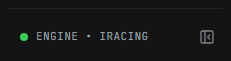
Green, with the game’s name: its data is coming in.
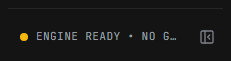
Orange: SimLogix runs, but gets nothing from a game.
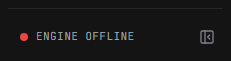
Red: the app’s engine doesn’t answer.
What to enable in the game
Nothing for iRacing or the three Assetto Corsa games. Two games need one setting, once:
Game
In the game
Automobilista 2
Options → System → Shared Memory = “Project CARS 2”
Le Mans Ultimate
Settings → Gameplay → “Enable Plugins”, then restart the game
When data comes in, game by game
Game
Data comes in
iRacing
while the sim runs
Assetto Corsa, AC EVO, AC Rally
on track, paused or in a replay
Automobilista 2
on track, paused, in an in-game menu or in a replay
Le Mans Ultimate
as soon as you have a car
What each game gives
iRacing gives the most: it’s the only one to give each car’s shift points, and the car on your left or right. In the editor, what your game doesn’t provide is greyed out.
Outside iRacing, in detail
No other game gives shift points: a rev bar on Auto (session) follows the max revs. For closer thresholds: shift points.
The track map doesn’t draw.
When a game doesn’t publish them, SimLogix computes the delta, the sectors, the fuel per lap and your personal best itself.
Without its setting, Automobilista 2 or Le Mans Ultimate runs without SimLogix seeing it: the light stays orange, with no other message.
Only iRacing has been checked in a race; the other games are still to be confirmed behind the wheel. Assetto Corsa EVO, in early access, can still change.
60 times a second: SimLogix reads your game at iRacing’s rate. 10 Hz spares a small PC, in Settings › General › Advanced.
Check it works
With the game running, the light turns green with its name.