Light up your LEDs
Your wheel's LEDs follow the revs, the flags, the pits. A profile drives them.
- 5 min
- LED wheel, or the bar on screen
The easy way: the first time you start SimLogix, each wheel you keep gets a “Rev bar” profile made for it, see Your first config. Otherwise, put a profile on by hand. Settings, lit buttons and the editor: the LEDs page.
Put a profile on your wheel
- LEDs: under the title, your wheel’s pill, or On screen if you don’t have one.
- Further down, a profile: Rev bar to start with. The wheel shows it large.
- On the right, “Put on” your wheel (Put it here for the bar on screen).
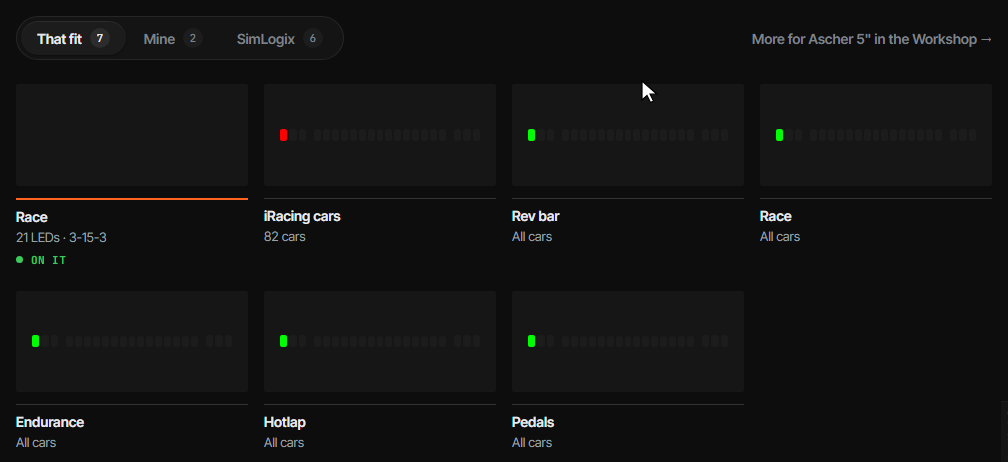
Presets to start from
- Rev bar: green, yellow, red, then the whole bar blue at the limiter.
- Race, Endurance, Hotlap, Pedals.
- iRacing cars: one variant per iRacing car.
- More in the Workshop: “More for … in the Workshop”, at the end of the profile tabs.
Supported hardware
- Cube Controls: the CSX-3 is checked; the FPRO, AMG and GTX2 are recognised.
- Ascher Racing: the Artura ULTIMATE (bar, pods and lit buttons), the Artura PRO (lit buttons) and the Dash 5”, recognised out of the box, their sheets shipped with the app.
- Conspit MAX 01: recognised out of the box.
- No LED wheel: the On screen pill shows the bar over your screen.
Another device
A device speaking the serial protocol of Arduino builds: New profile › My device isn't listed — scan ports. A wheel plugged in on the fly is found within a few seconds.
Shift points
Only iRacing gives each car’s shift points. With another game, the bar follows the max revs; for closer thresholds, set them in the LED editor: see shift points. Your config, step Wheel, shows what’s set.
Try without driving
- On the LEDs page, pick an alert in the thumbnails under the wheel (the flags…), then Try it on the wheel. The Rev bar only has the revs and the limiter: it lights up when you drive.
- Devices › your wheel › Identify makes it blink, to recognise it.
- At the bottom of the LED editor, the test bench replays scenarios in Simulated values. Send to hardware shows them on the wheel.
Good to know
Check it works
- In LEDs, your wheel’s pill has a green dot, and its profile is on the right.
- On track, the bar rises with the revs.
Stuck?
LEDs stay dark? Follow the The LEDs don’t light up sheet, one question at a time.