Settings
Language, background, the AI assistant, updates and help. Everything is saved at once.
One page, in four panels. Screens are no longer here: Screens → Devices leads to Devices.
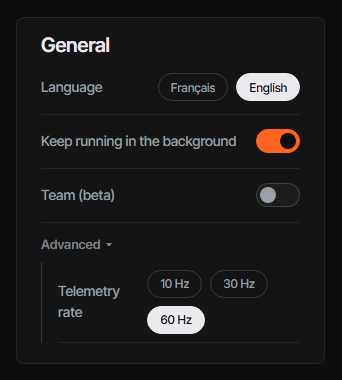
General
- Language: French or English, for the whole interface. A new install starts in English.
- Keep running in the background: the close button hides the window, and everything keeps running. The notification-area icon opens SimLogix again.
- Team (beta): turns Team on, in closed beta, by invitation. See the Team page.
- Folded under Advanced: Telemetry rate, 60 Hz by default, iRacing’s rate. 10 Hz spares a small PC.
The rate and the background, in detail
- The rate sets how often the game is read, the dashboards and the USB screens; the LEDs run at 30 Hz. A USB screen follows within its panel’s limit: up to 60 frames per second on the Ascher 5”, 25 on the CSX-3.
- Right-click the notification-area icon › Quit to close SimLogix. Switched off, the close button quits the app.
AI assistant
The assistants found on your PC, a Connect each, and the permission to write; Another assistant, folded, for another one. The details: the AI assistant page.
Updates
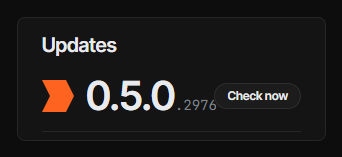
- The installed version, in large: give it when you report a problem.
- SimLogix looks for an update at each launch; Check now looks right away.
- What's new opens the what’s-new window again. The list of the version’s changes below it is in French only.
During an update
- SimLogix checks that your editor tabs are saved;
- it downloads the version;
- it turns off the screens and the LEDs, then closes while it installs.
On the next launch, the What's new window opens by itself, once: the new features, each with a button to its page, and the fixes. There’s no channel to pick: the beta is a separate app, “SimLogix (Beta)”.
Help
- Report a problem: opens the Need help? drawer on the form; a ticket goes to the SimLogix Discord, with your version and the app’s logs. See The log, and reporting a problem.
- Logs: opens the logs folder. See The log, and reporting a problem.
- Open Discord: the SimLogix Discord, for a question about the app or the hardware it drives.
- Documentation: this wiki. At the bottom: the bundled fonts and the Supporters.
Good to know
Launching a config replaces the Settings rate, and stopping it doesn’t put it back.
Elsewhere: screens (cockpit, phone, USB screens) are set in Devices; the fuel unit in Customize… of the dashboards that offer it. No start with Windows.